If your business isn't showing up in Google Maps results, your competitors are getting the calls you should be getting. For local service businesses — plumbers, dentists, HVAC companies, lawyers, restaurants, auto repair shops — Google Maps isn't a nice-to-have. It's where purchase decisions are made.
This guide breaks down every factor that determines your Google Maps ranking, what actually moves the needle in 2026, and the specific actions you can take this week to start climbing.
What Is Google Maps SEO (and Why Should You Care)?
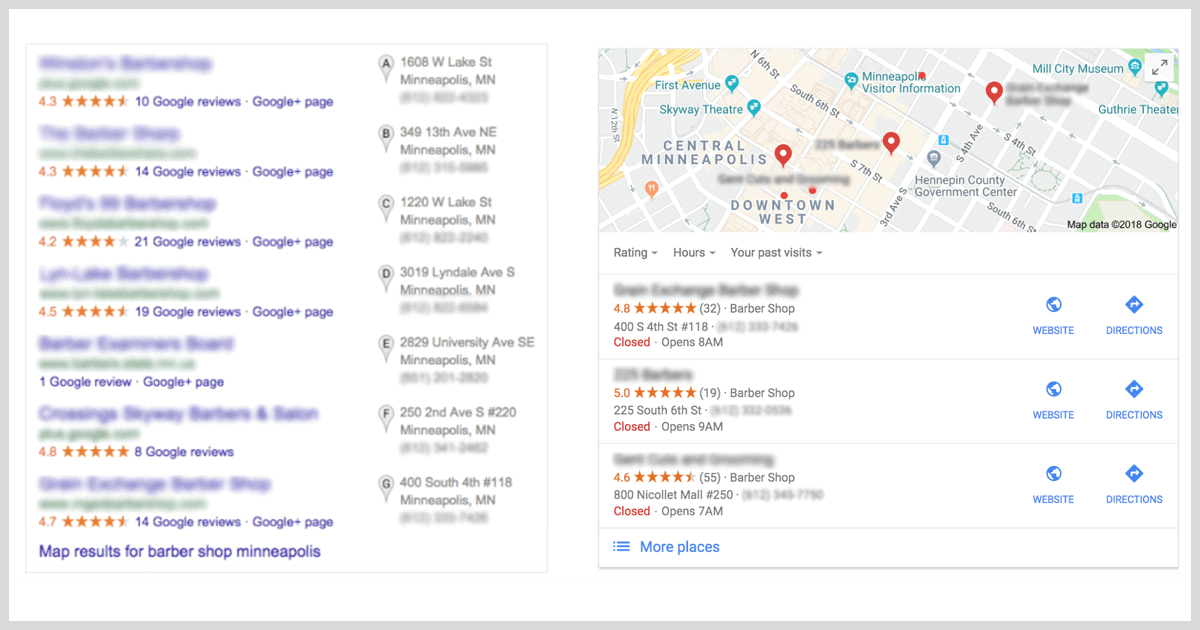
Google Maps SEO is the practice of optimizing your online presence so your business ranks higher in local map results — specifically, in what Google calls the Local Pack: the cluster of three business listings that appears at the top of search results when someone searches for a service near them.
Ranking in the Local Pack matters for one simple reason: real estate. A business in the top three Local Pack results captures the vast majority of clicks on that page. Studies from BrightLocal consistently show that the #1 Local Pack result earns roughly 44% of all clicks, while organic results below it fight over what's left.
For a plumber, HVAC company, or law firm, that difference in visibility isn't abstract — it translates directly to phone calls and booked jobs.
Google determines local rankings using three core signals:
- Relevance — How well your business profile matches what someone is searching for
- Distance — How close your business is to the searcher's location
- Prominence — How well-known and authoritative your business appears online
You can't move your business to be closer to searchers. But relevance and prominence? Those you can absolutely control.
1. Claim and Fully Optimize Your Google Business Profile
Your Google Business Profile (GBP) is the single most important asset in your Google Maps SEO strategy. An unclaimed, half-completed profile is like a storefront with no sign and the lights off.
To claim your profile:
- Go to google.com/business and log in with a Google account
- Search for your business name — if it appears, select it and click "Claim this business"
- If it doesn't appear, click "Add your business to Google" and fill in the details
Verification is required before Google gives you full control. Options include postcard, phone, email, or video verification depending on your business type. Instant verification is available if your website is already verified in Google Search Console.
Once verified, optimize every section:
- Business name — Use your real business name. Don't keyword-stuff it (e.g., "Joe's Plumbing – Best Emergency Plumber Chicago"). Google has penalized and suspended listings for this.
- Primary category — This is the most important ranking factor within your profile. Choose the most specific, accurate category for your main service.
- Additional categories — Add every relevant secondary category. A dental practice might add "Cosmetic Dentist," "Pediatric Dentist," and "Emergency Dental Service" alongside "Dentist."
- Business description — Write 250–750 words describing what you do, who you serve, and what makes you different. Include your primary keyword and location naturally.
- Services and products — List every service with a name, description, and price (or price range). Google indexes these and uses them to match your listing to specific queries.
- Attributes — These small checkboxes ("women-owned," "veteran-led," "online appointments available") contribute to relevance matching for filtered searches.
- Photos — Businesses with more than 100 photos receive significantly more calls and direction requests than those with fewer than 10. Add exterior shots, interior photos, team photos, and photos of your work in progress. Update them regularly.
- Business hours — Keep these accurate. Wrong hours are one of the fastest ways to destroy your review rating and signal to Google that your listing is poorly maintained.
2. Get Your NAP Consistent Everywhere
NAP stands for Name, Address, and Phone Number. It sounds boring. It matters enormously.
Google cross-references the NAP information on your Google Business Profile against every other mention of your business online. When those mentions are consistent, Google gains confidence that your business is legitimate and accurately represented. When they conflict — your website lists a different phone number than Yelp, or your address is formatted differently across directories — it creates ambiguity that suppresses your ranking.
What consistent NAP looks like in practice:
| Platform | Name | Address | Phone |
|---|---|---|---|
| Google Business Profile | Metro Plumbing Co. | 412 N Halsted St, Chicago, IL 60642 | (312) 555-0190 |
| Website footer | Metro Plumbing Co. | 412 N Halsted St, Chicago, IL 60642 | (312) 555-0190 |
| Yelp | Metro Plumbing Co. | 412 N Halsted St, Chicago, IL 60642 | (312) 555-0190 |
| BBB | Metro Plumbing Co. | 412 N Halsted St, Chicago, IL 60642 | (312) 555-0190 |
Even minor discrepancies — "St." versus "Street," a suite number included on one listing but not another — can create a mismatch signal. Audit your existing citations and standardize the format before you start building new ones.
3. Build Local Citations Across Authoritative Directories
A citation is any online mention of your business's NAP information. Beyond Google, citations on third-party directories tell Google that your business exists and is worth knowing about.
Start with the universally high-authority directories:
- Yelp
- Apple Maps
- Bing Places for Business
- Yellow Pages
- Better Business Bureau (BBB)
- Chamber of Commerce websites
Then move to industry-specific directories based on your niche:
- Healthcare: Healthgrades, Zocdoc, Vitals
- Legal: Avvo, Justia, FindLaw
- Real estate: Zillow, Realtor.com, Trulia
- Home services: HomeAdvisor, Angi, Thumbtack, Houzz
- Restaurants: Yelp, TripAdvisor, OpenTable, Zomato
Don't spread yourself thin trying to list on 200 directories at once. Twenty highly authoritative citations done correctly outperform 200 mediocre ones with inconsistent information. Tools like BrightLocal, Moz Local, or Yext can help you manage citations at scale and catch inconsistencies automatically.
4. Generate and Respond to Customer Reviews Strategically
Reviews are one of the three most influential factors in your Google Maps ranking. More precisely: the volume of reviews, the average star rating, and the recency of reviews all affect where you land.
A business with 200 reviews and a 4.6-star average will generally outrank a business with 20 reviews and a 5.0-star average. Volume and recency signal active customer engagement.
How to get more reviews without violating Google's guidelines:
- Ask right after the moment of satisfaction — when the customer thanks your technician, when they compliment the food, when the appointment ends well
- Send a follow-up text or email with a direct link to your Google review page (find this in your GBP dashboard under "Get more reviews")
- Add a QR code to your receipts, invoices, and business cards that links directly to the review form
- Train your team to ask verbally — "If you're happy with the service, we'd really appreciate a Google review"
Do not offer incentives in exchange for positive reviews. Google's policies prohibit this, and violations can result in listing suspension.
Responding to reviews is not optional:
Responding to every review — positive and negative — signals to Google that your business is actively engaged. More practically, your responses are read by potential customers who are deciding whether to call you.
For positive reviews: thank the customer specifically, mention the service or location, and invite them back.
For negative reviews: respond within 24–48 hours, apologize for the experience without admitting fault, and offer to resolve the issue offline. Never get defensive or argue. Your response is marketing, not a personal conversation.
5. Optimize Your Website for Local Keywords
Your website is the anchor for your Google Maps ranking. Google uses your website to validate and expand on what your GBP claims — so a well-optimized local website strengthens your map listing, and a thin or generic website undermines it.
Local keyword optimization starts with your homepage:
Your homepage should clearly state what you do, where you do it, and for whom. If you're an HVAC company serving Denver, your H1 shouldn't be "Quality Heating and Cooling Services." It should be something like "Denver's Trusted HVAC Repair & Installation Company."
Build location-specific pages for every area you serve:
If you operate in multiple cities or neighborhoods, create a dedicated landing page for each one. A roofing company serving Dallas shouldn't cram "roofing in Dallas, Plano, McKinney, and Frisco" into one page. Each city warrants its own page with unique content: local landmarks, area-specific building codes, testimonials from customers in that neighborhood.
Implement LocalBusiness schema markup:
Schema markup is structured data you embed in your website's code that explicitly tells Google your business name, address, phone number, hours, and service area. This is not visible to visitors but is read by Google's crawlers. Use Google's Rich Results Test tool to verify your schema is implemented correctly.
Embed a Google Map on your Contact page:
Embedding a Google Map on your website creates a direct link signal between your site and your GBP. It also improves the user experience for customers trying to find your location.
Optimize title tags and meta descriptions for local intent:
- Title tag example:
Roofing Contractor in Austin, TX | Storm Damage Repair | [Business Name] - Meta description example:
Austin's #1 rated roofing contractor. Insurance claim specialists, same-day estimates. Serving Austin, Round Rock & Cedar Park. Call (512) 555-0100.
6. Use Google Posts to Stay Active and Relevant
Google Posts are short updates (text, image, and CTA) that appear directly on your GBP in both Search and Maps results. They're underused by most local businesses and that's an opportunity.
Active posting signals to Google that your listing is current and managed. More importantly, posts give searchers a reason to engage with your listing beyond just calling for hours.
Four types of posts that work for local businesses:
- Offers and promotions — "10% off HVAC tune-ups this month" with a "Book Now" button drives direct conversions
- News and updates — New service offerings, staff additions, holiday hours
- Events — Workshop, open house, charity drive
- Product highlights — Feature a specific service with photos and a CTA
Posts expire after seven days (except Events and Offers which last until the end date you set). Aim to publish at least one post per week. Businesses that post consistently tend to have higher engagement metrics, which feeds back into Google's prominence signals.
7. Use the Q&A Section to Pre-Answer Buyer Questions
The Q&A feature on your Google Business Profile lets anyone ask a question about your business — and anyone can answer. If you're not managing this section, your competitors or random members of the public might be answering for you.
Take control of your Q&A section:
- Proactively add the questions you get asked most often, then answer them yourself. Examples: "Do you offer emergency services?" "Do you serve [specific neighborhood]?" "What payment methods do you accept?"
- Answer every question that comes in — ideally within 24 hours
- Include your primary keyword and city name naturally in your answers where it makes sense
- Pin your most important answers to keep them visible
From an SEO standpoint, Q&A content is indexed by Google. A plumber who consistently answers "Do you fix burst pipes in [City]?" is quietly signaling relevance for emergency plumbing searches in that area.
8. Build Backlinks to Your Website from Local Sources
Backlinks — other websites linking to yours — are a core ranking factor for Google Search and indirectly support your Google Maps ranking by increasing your website's overall authority.
For local businesses, local backlinks carry more weight than generic ones. A link from the Chicago Tribune's local business section does more for a Chicago electrician than a link from a generic business directory.
Where to pursue local backlinks:
- Local Chamber of Commerce — Most chambers offer a member directory listing with a link
- Local news sites and blogs — Pitch a story about your business, sponsor a local event that gets covered, or offer expert commentary on a local issue
- Community sponsorships — Sponsoring a little league team, a 5K race, or a school fundraiser often earns a backlink from the organization's website
- Industry associations — National Trade Association directories and local contractor association websites
- Local partnerships — A landscaper who refers clients to a fence company, and vice versa, can exchange backlinks naturally
You don't need hundreds of backlinks. For most local markets, 20–40 high-quality local and industry-relevant backlinks put you ahead of most competitors.
9. Optimize for Mobile — Local Search Is Mobile Search
More than 60% of local searches happen on mobile devices, and "near me" searches have grown over 500% in the past several years according to Google's own trend data. If your website loads slowly or looks broken on a phone, you're losing customers who found you on Maps and then bounced from your site.
What mobile optimization means in practice:
- Page speed: your site should load in under 3 seconds on mobile. Use Google's PageSpeed Insights (pagespeed.web.dev) to identify issues
- Tap-friendly buttons: your phone number should be a clickable
tel:link. Your contact form buttons should be large enough to tap without zooming - Responsive design: your layout should adapt to any screen size without horizontal scrolling
- No interstitials: pop-ups that block the entire screen on mobile get penalized by Google
A fast, mobile-friendly website doesn't just improve user experience. It directly reduces your bounce rate, which is a behavioral signal Google uses as a proxy for satisfaction.
10. Track Your GBP Insights and Iterate
Optimizing your Google Maps presence isn't a one-time project. It's an ongoing discipline. Google Business Profile Insights gives you the data to know what's working.
Key metrics to monitor monthly:
| Metric | What It Tells You |
|---|---|
| Search queries | What terms people used to find your listing |
| Views (Search vs. Maps) | How much of your traffic comes from Maps specifically |
| Direction requests | Proxy for in-person visit intent |
| Phone calls | Direct conversion metric |
| Website clicks | Measures traffic driven from your GBP |
| Photo views | Engagement signal; more views = more active listing |
If you see a spike in direction requests in a particular neighborhood, that's a signal to create more content targeting that area. If certain search queries are driving views but not calls, your listing may need a stronger CTA or better photos to convert that interest.
Compare your metrics against your competitors using the "How you compare to similar businesses" section in your GBP dashboard. It shows how your photo count, review count, and search visibility stack up — and where your gaps are.
Google Maps Ranking Factors: Quick Reference
| Factor | Impact Level | Your Control |
|---|---|---|
| Google Business Profile completeness | Very High | Full |
| Review volume and rating | Very High | Moderate |
| NAP consistency | High | Full |
| Proximity to searcher | High | None |
| Local citations | High | Full |
| Website local optimization | High | Full |
| Behavioral signals (clicks, calls, directions) | Medium-High | Indirect |
| Backlink profile | Medium | Moderate |
| Google Posts activity | Medium | Full |
| Q&A engagement | Medium | Full |
When to Hire a Google Maps SEO Expert
DIY local SEO is absolutely viable for a single-location business in a low-competition market. But there are situations where professional help produces returns that self-managed efforts simply won't match:
- Competitive markets — If you're a personal injury lawyer in Los Angeles or an HVAC company in Chicago, your competitors are spending serious money on local SEO. Competing without professional help is like showing up to a race in a sedan.
- Multi-location businesses — Managing separate GBP listings, location pages, and citation profiles for five or ten locations requires systems and tools most business owners don't have time to maintain.
- After a ranking drop — If you were ranking well and suddenly dropped, something specific happened — a listing suspension, a Google algorithm update, a competitor manipulation report. An experienced local SEO company can diagnose and resolve it faster.
- Scaling lead generation — When phone calls and direction requests are your main source of revenue, the ROI on professional local SEO services is often measurable within 60–90 days.
When evaluating local business SEO packages, ask providers for specific examples of ranking improvements they've achieved in your industry, how they report on results, and what their approach is to review generation. Any company promising to "guarantee" the #1 spot is overpromising — ranking factors involve variables no one fully controls.
Conclusion
Ranking higher on Google Maps is not a mystery. It's a process one that rewards businesses that put in consistent, methodical work across their GBP, their website, their citations, and their reputation.
Start with the highest-leverage actions: verify and complete your Google Business Profile, standardize your NAP across the web, and build a system for collecting reviews. From there, layer in citation building, local website optimization, and regular posting. If you're in a competitive market or managing multiple locations, partnering with a local business SEO company with a track record in your industry will accelerate your results significantly.
Your next customer is already searching. The question is whether they find you or your competitor.